Quackland
- Benjamin Zhang
- Jun 2
- 6 min read


Role: Programmer / Project Manager / Systems & Narrative Design SupportGenre: 2D Top-Down Simulation / Society SandboxPlatform: PCEngine: UnityTeam Project
Overview
Quackland is a 2D top-down simulation game about a growing duck society. Instead of directly controlling individual ducks, the player acts as the collective will of the flock. Ducks move, collide, reproduce, build, consume resources, and gradually form their own social structures. The player influences this society through indirect decisions: placing building foundations, issuing short-term instructions, managing resources, and responding to the evolving needs of the duck population.
The project started from a simple but interesting question: what if an incremental resource game became a living society simulator? We wanted to preserve the satisfaction of collecting and expanding, but connect that progression to survival, loss, social behavior, and emergent storytelling. In Quackland, crumbies are not only a currency for growth. They are also food, construction material, and a pressure point for the entire duck civilization.
My work focused on making this simulation readable, expressive, and manageable for both players and developers.

Design Goals
The main design goal was to create a simulation where players feel responsible for a society without fully controlling it. Ducks should feel silly, autonomous, and unpredictable, but the systems around them should still be understandable enough for players to make meaningful decisions.
The game’s major systems include:
System | Purpose |
Duck Society Simulation | Ducks live, move, age, reproduce, and die over time. |
Habitat Construction | Players place foundations, while ducks physically complete buildings through interaction. |
Active Decision Points | Player actions are limited by a rechargeable decision resource. |
Social Formation | The duck society evolves based on its actual social and material conditions. |
Meetings & News | Ducks communicate events, thoughts, and crises to the player. |
Resource Economy | Crumbies function as food, construction cost, and universal production output. |
A key part of the design was that social formations are not selected like a menu option. They emerge from how the player develops the duck habitat. For example, a happier and healthier duck society may naturally move toward one kind of formation, while an industrialized or resource-heavy society may evolve differently.
My Contributions
1. Quacxicon — Text Management System
One of my main programming contributions was Quacxicon, a text-management system built to support the game’s narrative and UI text needs.
Because Quackland relies heavily on small duck thoughts, world updates, news headlines, and event messages, we needed a flexible way to store and retrieve text without hardcoding everything. Quacxicon was designed as a centralized text database that could organize lines by tags and output them in different ways.
What Quacxicon Supports
Feature | Function |
Tagged Text Groups | Text can be grouped by situation, duck behavior, building type, event type, or narrative category. |
Random Playback | The system can select random lines to keep repeated events feeling fresh. |
Sequential Playback | Text can also be played in order for structured events or tutorials. |
TXT Import | Writers/designers can import .txt files directly, reducing the need to manually edit code. |
Reusable Text Calls | Other systems can request appropriate text through tags instead of handling text manually. |
This system made narrative iteration much easier. Instead of rewriting code every time we wanted to add a new duck thought or event message, we could update the text data and let Quacxicon handle retrieval.

2. Log Box — Real-Time Society Feedback
I designed and implemented the Log Box, a real-time event feed that reports what is happening inside the duck society.
The purpose of the Log Box was to make the simulation feel alive and readable. Since players do not directly control individual ducks, they need a way to understand what the ducks are doing, what events are occurring, and how the society is changing.
The Log Box can display:
Duck behavior updates
Society-level events
Randomized duck thoughts
Building-related updates
Birth, death, and population-related information
Small narrative moments that give personality to the flock
This helped turn background simulation data into player-facing storytelling. A duck bumping into something, becoming productive, aging, or participating in society could become a visible moment rather than an invisible calculation.
3. Duck News — Procedural Narrative Moments
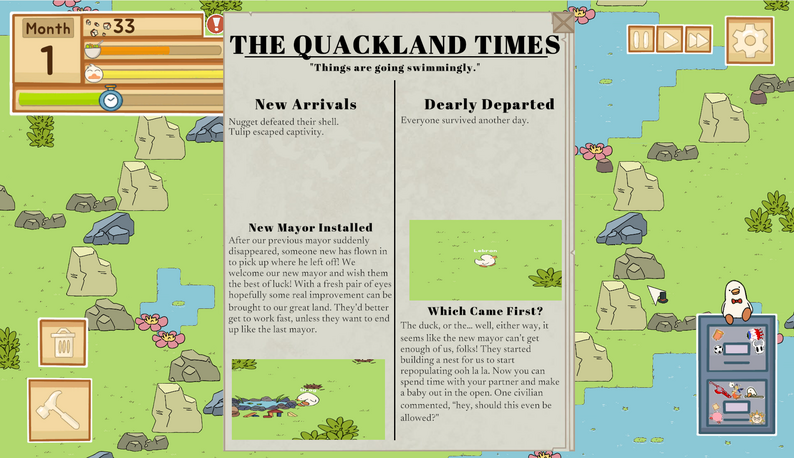
I also designed and built Duck News, a feature that randomly captures moments from the duck society and presents them like in-world news.
Duck News was meant to add humor and emergent storytelling. Instead of only showing numerical updates, the game could frame duck activity as a living civilization with its own headlines and strange little incidents.
The system can:
Randomly capture screenshots of duck situations
Generate news-style updates
Reflect larger social trends, such as birth rate and death rate
Add comedic and narrative texture to the simulation
This feature helped connect systemic gameplay with personality. It made the duck society feel less like a spreadsheet and more like a world worth watching.
4. Visual Feedback & Animation Support
I implemented several visual feedback systems for ducks and buildings, including:
Effect | Usage |
Color Change | Communicating state changes, reactions, or temporary effects. |
Scaling | Emphasizing interaction, impact, or feedback. |
Shake Effects | Adding punch to building, collision, or event moments. |
Duck Animation Logic | Handling age-based animations and grabbed-state animations. |
These systems were built to help the team create readable feedback quickly. In a simulation game with many small events happening at once, clear visual language is important. Even simple effects like shaking or scaling can help players understand that something has happened.
5. Project Management & Sprint Tracking
Alongside programming, I also handled a significant amount of project management.
My responsibilities included:
Organizing sprint goals
Tracking feature progress
Checking what systems were missing or falling behind
Updating Trello boards
Coordinating weekly project materials
Filling technical or design gaps when needed
Because Quackland had many interconnected systems, production tracking was important. A feature like Duck News depended on text generation, screenshots, UI display, and simulation data. The Log Box depended on event reporting and readable text output. Building systems depended on duck behavior, resource cost, and interaction logic.
My role was not only to implement isolated features, but also to keep the project moving as a connected whole.
Design Challenge: Making Indirect Control Feel Understandable
One of the biggest design challenges was that the player does not directly control individual ducks. This created an interesting problem: how do we let players feel responsible without giving them full command?
Our answer was to make player influence indirect but legible.
Players could not simply click a duck and order it to work. Instead, they could place building foundations, spend Active Decision Points, and create short-term tendencies that encouraged ducks to move toward certain goals. The ducks still behaved like ducks, but the player had tools to shape the society’s direction.
My systems supported this design goal by making invisible simulation data visible. The Log Box, Duck News, Quacxicon, visual effects, and animation feedback all helped explain what the ducks were doing and why the society was changing.
What I Learned
Quackland taught me a lot about designing systems that are both systemic and expressive. A simulation game can easily become too abstract if players only see numbers. At the same time, it can become confusing if too many events happen without explanation.
My main takeaway was that feedback systems are not secondary polish. In a game like Quackland, feedback is part of the core design. Text, animation, UI updates, and small narrative moments are what allow players to understand and emotionally connect with the simulation.
This project also strengthened my ability to work across multiple roles. I contributed as a programmer, but I also had to think like a systems designer, a narrative designer, and a producer. I built tools, implemented player-facing features, supported the team’s workflow, and helped keep the project organized.
Skills Demonstrated
Unity gameplay programming
Tool/system design
Text database architecture
UI/event feedback systems
Emergent narrative support
Simulation readability
Sprint planning and production tracking
Cross-disciplinary communication
Technical implementation for design needs
Portfolio Summary Version
Quackland is a 2D top-down duck society simulation where players guide a flock indirectly as its collective will. I contributed as a programmer, project manager, and systems design supporter. My main technical work included Quacxicon, a tagged text-management system with random/sequential playback and .txt import support; the Log Box, a real-time event feed for duck society updates; and Duck News, a procedural news system that captures duck moments and turns simulation data into playful narrative feedback. I also implemented visual effect systems for ducks and buildings, handled animation logic for age-based and grabbed states, and managed sprint tracking through Trello. Through this project, I focused on making a complex autonomous simulation more readable, expressive, and production-friendly.


Comments